The Guide to Select the Right LMS for your Project
Selecting a Learning Management System (LMS) is a significant decision for any UK organisation. The platform may become the central system used to deliver employee training, manage mandatory learning, maintain compliance evidence and report on workforce capability.
The LMS market includes everything from simple course-delivery platforms to configurable enterprise systems supporting employees, contractors, customers, professional members and external partners.
A long feature list does not necessarily make an LMS the right choice. The best platform will align with your organisation’s objectives, regulatory responsibilities, workforce structure, technology environment and plans for future growth.
This 15-point buyer’s guide explains what UK organisations should examine when comparing learning management systems.
1. Begin with business outcomes rather than software features
Before contacting LMS providers, define what the organisation expects the new platform to achieve. Your objectives might include:
- Delivering online employee training
- Managing mandatory and compliance learning
- Improving employee or contractor onboarding
- Reducing training administration
- Maintaining audit-ready training records
- Managing certificates, licences and credentials
- Delivering continuing professional development
- Supporting customers, members or partner organisations
- Combining online, virtual and face-to-face learning
- Identifying workforce capability gaps
- Replacing an outdated or unsupported LMS
- Consolidating several learning systems into one platform
Turn these objectives into measurable outcomes wherever possible. For example, instead of stating that the organisation needs “better reporting”, define the reports managers need, who should receive them and how frequently they will be used. Separate your requirements into:
- Essential requirements
- Desirable capabilities
- Potential future requirements
This provides a structured basis for comparing suppliers and helps prevent decisions being driven by impressive but unnecessary features.
2. Map your learners, managers and administrators
An LMS must support everyone who uses or manages it—not only the learners completing courses. Identify each intended audience, such as:
- Employees
- Contractors and agency workers
- Volunteers
- Customers
- Professional members
- Partner organisations
- Learner managers
- Training administrators
- Course authors
- Compliance teams
- Human resources
- Senior management
Determine what each group needs to see and do. Learners need a clear dashboard showing required training, deadlines, learning history and certificates. Managers need visibility over their teams. Administrators need efficient allocation, communication and reporting tools. If the organisation trains several departments, customers or member organisations, assess whether the LMS supports:
- Separate organisational groups
- Hierarchical reporting structures
- Delegated administrators
- Distinct permissions
- Separate branding
- Data separation
- Organisation-specific training catalogues
A multi-tenant LMS may be particularly valuable for professional bodies, local authorities, corporate groups and organisations delivering training to external audiences.
3. Examine UK GDPR and data-protection responsibilities
An LMS may process names, email addresses, employment details, assessment results, qualifications, attendance information and other personal data. Data protection must therefore form part of the selection process. Establish whether your organisation will act as the data controller and the LMS provider as a processor. Review the proposed data-processing terms and ensure responsibilities are clearly documented. Questions for prospective providers should include:
- What personal information does the platform collect?
- Why is each category of information required?
- Where is the information processed?
- Which subprocessors are involved?
- How are data-subject requests supported?
- How are retention periods applied?
- Can records be exported, corrected and deleted?
- How quickly will a personal-data breach be reported?
- What happens to customer information when the contract ends?
- How will deletion be verified?
The provider should also be able to support privacy by design, data minimisation and appropriate access controls.
The Information Commissioner’s Office provides detailed guidance on UK GDPR responsibilities, processor arrangements and international data transfers. Your data-protection officer or adviser should review the proposed arrangements where necessary.
4. Understand hosting and international data transfers
Do not assume that a UK LMS provider hosts its data in the UK—or that an international provider cannot offer UK hosting. Ask the supplier to identify:
- The primary hosting region
- Backup and disaster-recovery locations
- Locations from which support staff can access data
- The hosting provider
- All relevant subprocessors
- Any international data transfers
- The safeguards used for restricted transfers
- How changes to subprocessors will be communicated
If personal data will be transferred outside the UK, determine whether the arrangement is covered by UK adequacy regulations or whether other safeguards are required.
Depending on the circumstances, this may include the UK International Data Transfer Agreement or the UK Addendum to approved EU Standard Contractual Clauses. The ICO advises organisations to identify whether a restricted transfer is taking place and confirm that an appropriate transfer mechanism and supporting safeguards are in place.
UK hosting can simplify some procurement and data-residency requirements, but hosting location alone does not demonstrate security or UK GDPR compliance. The complete processing arrangement must be considered.
5. Evaluate cybersecurity and supplier assurance
A learning platform may hold sensitive workforce and compliance information, making supplier security an essential evaluation area. Ask prospective providers for evidence covering:
- Information security governance
- ISO 27001 certification
- Cyber Essentials or Cyber Essentials Plus status
- Encryption in transit and at rest
- Multi-factor authentication
- Single sign-on
- Role-based access control
- Privileged-access management
- Vulnerability scanning
- Penetration testing
- Security monitoring
- Audit logging
- Incident management
- Backup and recovery
- Business continuity
- Disaster recovery
- Secure software development
- Employee security training
- Supplier and subprocessor management
Check the scope and validity of any certification rather than relying only on a logo displayed on a website. ISO 27001 and Cyber Essentials assess different aspects of security. The National Cyber Security Centre describes Cyber Essentials as a government-backed scheme focused on five technical controls that protect against common internet-based threats. Cyber Essentials Plus includes more rigorous independent technical testing.
A supplier may hold one standard without holding the other. Your requirements should reflect the risks, sector and procurement obligations applicable to your organisation.
6. Assess course creation and learning-content standards
Consider how training will be created, imported, maintained and updated. Ask whether the LMS includes built-in tools for creating:
- Multimedia course pages
- Videos and audio
- Tests and quizzes
- Assessments
- Surveys
- Reflective activities
- Downloadable resources
- Completion certificates
If your organisation already owns eLearning content, confirm support for standards such as:
- SCORM 1.2
- SCORM 2004
- xAPI
Do not accept compatibility as a statement alone. Ask the supplier to import and test one of your existing courses, demonstrating launch, bookmarking, completion and reporting. Also assess:
- Course version control
- Prerequisites
- Sequential learning programmes
- Recurring training
- Content approval
- Archiving
- Accessibility
- Content ownership
- Export rights
The ideal arrangement should allow authorised subject-matter experts to maintain routine content without requiring developers for every change.
7. Confirm support for blended learning
Many UK organisations combine self-paced learning with webinars, workshops, mentoring, practical assessment and face-to-face instruction. A suitable LMS should be capable of consolidating these activities into one training record. For virtual learning, examine integration with platforms such as:
- Microsoft Teams
- Zoom
- GoTo Meeting
- Other webinar or virtual-classroom services
For events and workshops, consider whether the system supports:
- Online registration
- Capacity limits
- Waiting lists
- Calendar invitations
- Automated reminders
- Attendance recording
- Cancellation management
- Follow-up activities
- Certificates
- Learner feedback
If workplace competency matters, assess whether managers or authorised verifiers can record practical observations and evidence against defined requirements.
8. Test compliance and recurring-training workflows
Organisations in sectors such as health and social care, housing, construction, financial services and local government may need to demonstrate that employees have completed mandatory learning. A compliance-focused LMS should do more than report course completions. Look for functionality that can:
- Assign training according to job role
- Assign requirements by team, service or location
- Set deadlines
- send automated reminders
- Escalate overdue training
- Schedule periodic refresher training
- Monitor certificates and credentials
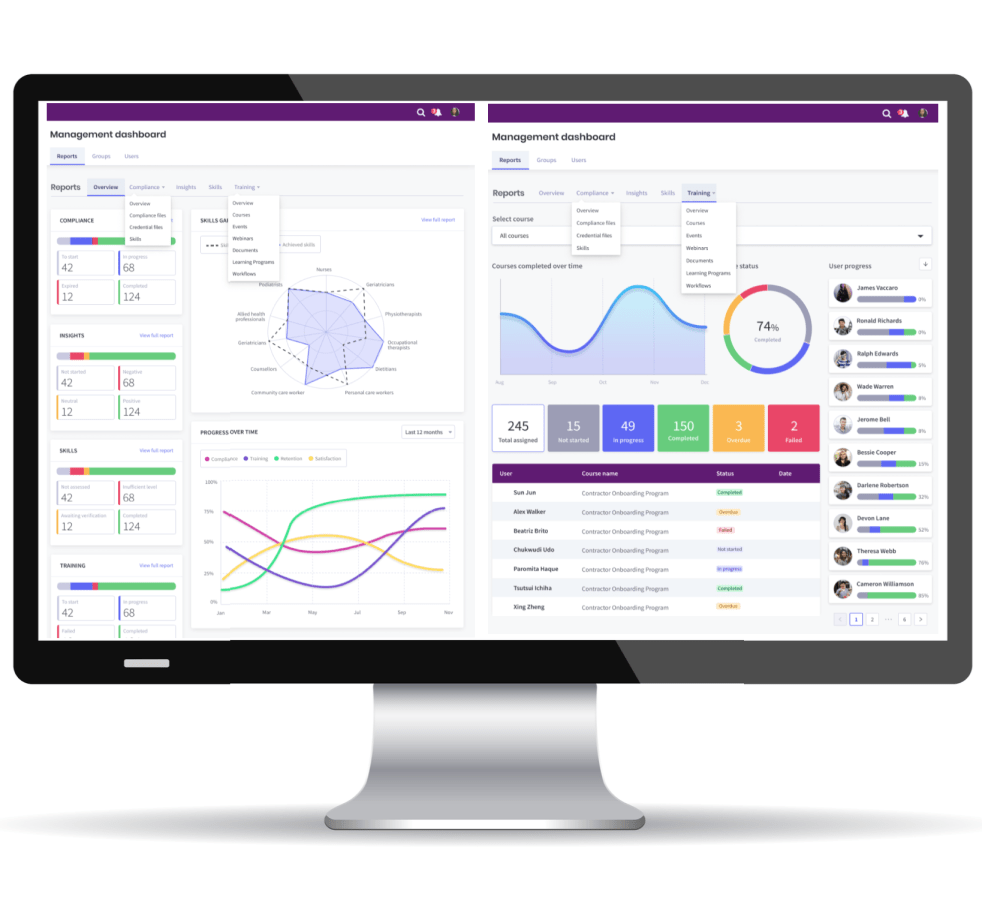
- Record external learning
- Track expiry dates
- Identify compliance gaps
- Maintain historical evidence
- Support manager verification
- Produce audit-ready reports
During demonstrations, ask the supplier to show what happens when:
- A new employee joins
- An employee changes roles
- A credential approaches expiry
- Training becomes overdue
- A mandatory course is updated
- An employee leaves
- An auditor requests historical evidence
These scenarios provide a much better test than viewing a generic dashboard.
9. Scrutinise reporting and audit evidence
Reporting requirements should be documented before the procurement begins. Identify the questions the organisation needs the LMS to answer, including:
- Who has completed mandatory training?
- Which requirements are overdue?
- Which certificates are approaching expiry?
- Which teams have the highest compliance risk?
- Which courses are being used?
- How are learners performing in assessments?
- Who attended an event or webinar?
- What training has an individual completed historically?
- Which managers need to take action?
- Can the organisation produce evidence for an audit?
Consider whether the platform supports:
- Real-time dashboards
- Manager self-service
- Scheduled reports
- Custom fields
- Filters
- Role-based visibility
- Report exports
- Audit logs
- Historical records
- Custom report creation
- Business-intelligence integration
Reports should be accurate, understandable and accessible to authorised users without requiring repeated intervention by the LMS provider. Ask every shortlisted supplier to generate several of your required reports during the demonstration.
10. Review integration and user-provisioning options
Manual user administration becomes inefficient as organisations grow. Consider whether the LMS can integrate with:
- Human resources systems
- Payroll platforms
- Identity and access-management services
- Microsoft Entra ID
- Customer relationship management systems
- Rostering applications
- Webinar platforms
- External content libraries
- eCommerce services
- Business-intelligence tools
Single sign-on can give users simpler and more secure access. Automated provisioning can create, update, group and deactivate user accounts using information from an authoritative business system.
Ask the supplier to explain:
- Which integrations are available as standard
- Which require custom development
- Whether an API is available
- How frequently information is synchronised
- How errors are identified and resolved
- Who maintains the integration
- What happens when connected systems change
- Whether additional charges apply
The implementation proposal should define integration responsibilities clearly.
11. Evaluate usability across every role
An LMS may have extensive functionality and still deliver poor results if users find it difficult to navigate. Ask to see the actual interfaces used by:
- Learners
- Managers
- Administrators
- Course authors
- Reporting users
Learners should be able to sign in, locate required training, resume learning and access their records without extensive instructions. Managers should be able to identify overdue training, expiring credentials and team compliance gaps without relying on an administrator to produce every report. Administrators should be able to complete routine activities efficiently, including:
- Adding users
- Allocating training
- Managing groups
- Updating deadlines
- Creating reports
- Communicating with learners
- Publishing content
- Resolving common support issues
Where possible, invite representative users to participate in product evaluation and user-acceptance testing.
12. Include accessibility and inclusive design
Accessibility should be included from the beginning of LMS procurement and content development. Assess whether the platform supports:
- Keyboard-only navigation
- Screen readers
- Appropriate colour contrast
- Visible focus indicators
- Resizable text
- Alternative text
- Captions and transcripts
- Accessible forms
- Responsive mobile presentation
- Clear error identification
- Consistent navigation
Ask the provider which version and level of the Web Content Accessibility Guidelines it targets, how it tests conformance and what evidence it can provide.
UK public-sector organisations should pay particular attention to the Public Sector Bodies (Websites and Mobile Applications) Accessibility Regulations 2018. Current government guidance directs public-sector teams to assess conformance against WCAG 2.2 and publish an accessibility statement.
The accessibility of the LMS does not automatically make every uploaded course accessible. Your organisation will also require accessible content templates, author training and quality-assurance processes.
13. Plan implementation, migration and organisational change
An LMS implementation is a business-change project as well as a technology project. Ask the provider to explain its approach to:
- Discovery
- Project governance
- Configuration
- Branding
- Data migration
- Integration
- Administrator training
- User acceptance testing
- Communications
- Go-live
- Hypercare
- Transition to ongoing support
For migration, determine:
- Which records will be transferred
- How historical completions will be treated
- What data format is required
- How duplicate or incomplete records will be resolved
- How accuracy will be validated
- Who will approve the migrated data
- How legacy data will be retained
The project plan should identify responsibilities for both the supplier and customer. You should also plan how the change will be communicated to learners and managers. Clear leadership support, training and internal communication can have as much influence on adoption as the software itself.
14. Calculate the complete cost of ownership
LMS pricing can be based on registered users, active users, modules, portals, storage, administrators or other measures. Compare the total cost rather than the headline licence fee. Your evaluation should include:
- Annual software subscription
- VAT
- Hosting
- Backup and disaster recovery
- Implementation
- Configuration
- Branding
- Data migration
- Integrations
- Training
- Technical support
- Course-authoring tools
- Learning-content licences
- Additional storage
- Additional environments
- Future user growth
- Annual price increases
- Contract-exit assistance
- Data export
Ask each supplier to provide pricing for your current requirements and at least two growth scenarios. Also establish:
- The minimum contract period
- Renewal provisions
- Indexation or annual increases
- Notice requirements
- What is included in support
- What constitutes chargeable professional services
- Whether implementation is fixed-price
- What happens if user numbers decrease
Predictable pricing is particularly important where the LMS will be used across several years.
15. Conduct structured due diligence
The final decision should be supported by evidence rather than sales claims. Request:
- Relevant customer case studies
- References from comparable organisations
- Security documentation
- Certification details
- Accessibility information
- Data-processing terms
- Service levels
- Implementation plans
- Support arrangements
- Product roadmap information
- Business continuity evidence
- Exit and data-return provisions
Give every shortlisted supplier the same demonstration scenarios and evaluation criteria. Example scenarios could include:
- Add a new employee and allocate training automatically according to their role.
- Move an employee into a new department and update their requirements.
- Upload a professional certificate and monitor its expiry date.
- Identify incomplete training across a management hierarchy.
- Create a webinar with registrations and automated reminders.
- Import and report on a SCORM course.
- Produce historical evidence for a compliance audit.
- Deactivate a departing employee while retaining the required record.
- Generate a report for an authorised line manager.
- Export organisational training records at contract end.
Use a weighted evaluation scorecard covering functionality, security, privacy, accessibility, implementation, service, supplier capability and cost.
For public-sector procurements, organisations should also consider the requirements applying under the Procurement Act 2023 and associated guidance. The Act’s procurement regime came into force on 24 February 2025.
Making the final LMS decision
The right learning management system should provide more than a place to host online courses. It should help your organisation:
- Reduce training administration
- Automate recurring learning
- Improve learner access
- Give managers meaningful visibility
- Maintain reliable compliance evidence
- Support data-protection and security responsibilities
- Integrate with existing systems
- Adapt as organisational requirements change
Start with the outcomes your organisation needs, involve the appropriate stakeholders and test each shortlisted platform using real operating scenarios.
A disciplined selection process will help you identify an LMS that supports immediate training requirements while providing a stable foundation for future workforce development.
PowerHouse Upskill for UK organisations
PowerHouse Upskill is a configurable Learning Management System for organisations that need to deliver learning while managing workforce training, credentials and compliance. The platform supports:
- Online course publishing
- SCORM content
- Tests and assessments
- Webinars and face-to-face events
- Structured learning programmes
- Employee and contractor onboarding
- Role-based training allocation
- Recurring and mandatory learning
- Certificates and compliance evidence
- Manager dashboards
- Multi-tenant groups
- Continuing professional development
- Single sign-on
- Enterprise-system integration
- UK hosting options
- Security governance supported by ISO 27001
- Quality management supported by ISO 9001
PowerHouse Hub has experience supporting UK organisations and complex learning environments across sectors including construction, care, housing, education and the public sector.
Discuss your UK LMS requirements
Selecting an LMS is easier when prospective providers demonstrate how your workforce structure, training programmes, integrations and reporting requirements would operate in practice.
Book a PowerHouse Upskill demonstration to discuss your requirements and explore a configurable learning and compliance platform for your UK workforce.